Tell us what you run. We’ll show you what’s exposed.

Ovesion checks every new CVE against the exact versions you run, then tells you how urgent each one is and why.

  • Checked against your exact version
  • Ranked by real-world exploitation
  • Every verdict shows its evidence
  • No agent, no scanning, no credentials
CVE-2026-24858EXAMPLE FINDING
Fortinet FortiOS (FortiGate)
VERDICT ✓ CONFIRMED CONTEXT Production, internet‑facing PRIORITY ACT NOW
RECOMMENDED MITIGATION Upgrade FortiOS to 7.6.6 or later A later fix, 7.6.7, is already known in this branch.
CISA KEV Affected version range Official product ID Evidence attached
CVE-2026-24858EXAMPLE FINDING
Fortinet FortiOS (FortiGate)
VERDICT ✓ CONFIRMED CONTEXT Production, internet‑facing PRIORITY ACT NOW
RECOMMENDED MITIGATION Upgrade FortiOS to 7.6.6 or later A later fix, 7.6.7, is already known in this branch.
CISA KEV Affected version range Official product ID Evidence attached

Diagram: five inputs, the global CVE feed, vendor and CNA records from the source, CISA KEV, FIRST EPSS and your stack, flow into Ovesion. Most vulnerabilities come out as grey noise that doesn’t touch your stack and fade away. The rest are sorted into one of four verdicts: Confirmed, Affected if installed, Needs Review, or Not affected. Not-affected CVEs drop off your list; anything Ovesion can’t decide stays, with the reason. An example finding card shows CVE-2026-24858, Fortinet FortiOS (FortiGate), Confirmed, production and internet-facing, priority Act Now, upgrade FortiOS to 7.6.6 or later, evidence attached.

THE PROBLEM

The feed doesn’t know what you run.

You get the whole feed.

Thousands of new CVEs every month.

Names don’t match.

The same product, different names in different records.

Mentions aren’t exposure.

A CVE naming your product may not affect your version.

Fewer than 1 in 5

new CVEs published in the 30 days to 10 October 2026 had NVD product data on that day. Without it, NVD’s own records don’t say which products the rest affect. Ovesion also reads vendor and CNA records, so it doesn’t rely on NVD alone.

SOURCE: OVESION ANALYSIS OF NVD DATA BACKGROUND: NIST, APRIL 2026

HOW IT WORKS

From a new CVE to exactly what to do.

Here’s every step between a CVE being published and knowing exactly what to do about it.

  1. 1
    YOU ADD

    Fortinet FortiOS 7.6.4

    You pick FortiOS from the catalogue and enter the exact version you run. Nothing to install, no network access. First findings usually appear within a few minutes.

  2. 2
    GLOBAL FEED

    Critical, CVSS 9.8

    An authentication bypass in several Fortinet products, including FortiOS, exploitable when FortiCloud SSO sign-in is enabled. Published to the global CVE feed.

  3. 3
    OVESION IDENTIFIES

    Fortinet FortiOS (FortiGate)

    Ovesion matches the CVE to the product you run using its official product identifier, not just its name. This is a match at the highest confidence level.

  4. 4
    OVESION CHECKS APPLICABILITY

    Confirmed

    The CVE affects FortiOS 7.6.0 through 7.6.5. Your version, 7.6.4, is inside that range. Not every match ends Confirmed: others come out ∿ Affected if installed, ? Needs Review, or — Not affected, which is removed from your list.

  5. 5
    YOUR ENVIRONMENT

    Production, internet-facing

    Deployment context that raises operational exposure, not just a severity label.

  6. 6
    OVESION SCORES

    Act Now

    CVSS 9.8, on CISA’s list of actively exploited flaws, an 86% chance of exploitation in the next 30 days (FIRST EPSS), and a production, internet-facing deployment. 12.8 in total, capped at 10 out of 10.

  7. 7
    RECOMMENDED MITIGATION

    Upgrade to 7.6.6 or later

    Ovesion judges by version. Whether FortiCloud SSO is switched on is yours to check.

Score scale from 0 to 10, with thresholds at 4.0 Investigate, 7.0 Prioritise and 9.0 Act Now. The example finding, CVE-2026-24858, starts at CVSS 9.8. KEV, EPSS, production and internet-facing factors raise it to the 10.0 cap: Act Now.

WHAT YOU GET

See what’s exposed, why, and what’s still open.

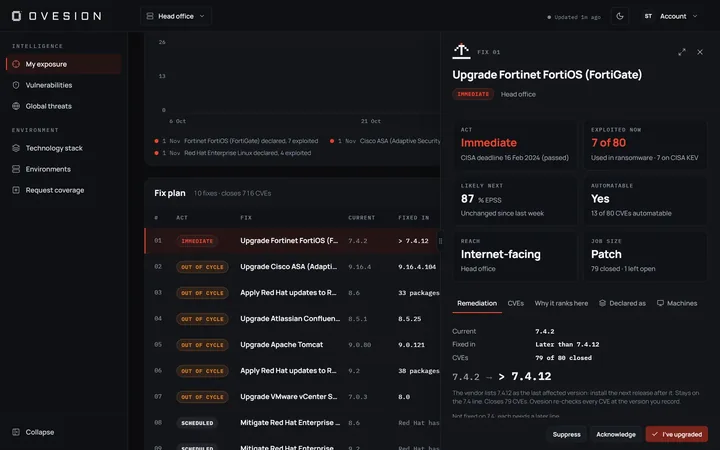
01 · THE OVERVIEW

Your exposure at a glance.

Act Now items, affected technologies, version coverage and triage progress on one screen, with your riskiest technologies ranked.

02 · ONE ACT NOW ITEM

Know why, not just what.

Every finding shows its score, its match and what each source said.

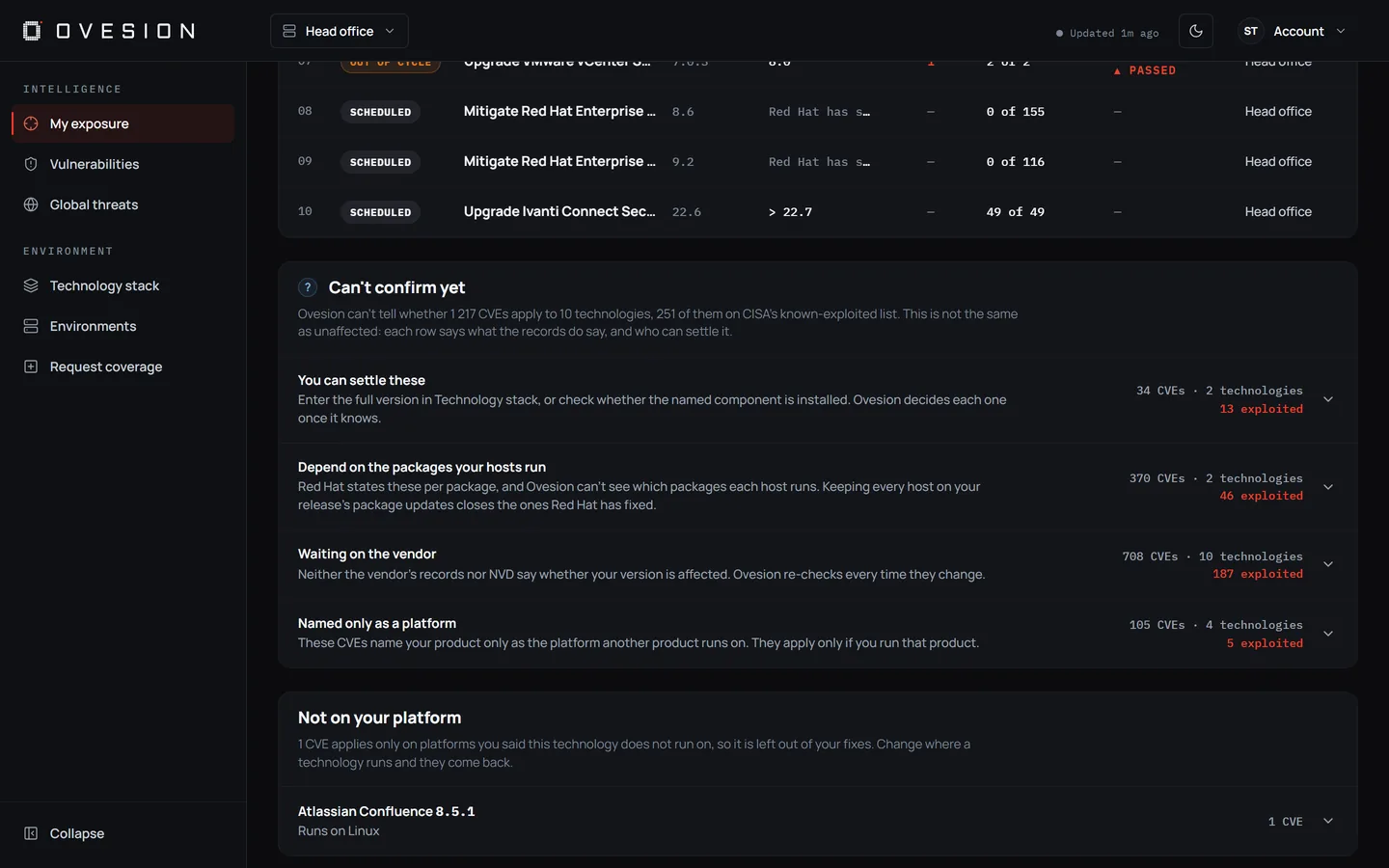
03 · WHAT’S STILL OPEN

Unknowns become a to-do list.

What Ovesion can’t decide yet is grouped by what will settle it.

EXAMPLEHead office · Needs Review
?Needs Review▲ 2 known exploited
You can settle these
nginxNo version entered
Microsoft SQL ServerNo version entered
Waiting on vendor data
Cisco ISE 3.2.0Sources do not cover your version▲ 2 known exploited
Keycloak 26.6.3No version data for this CVE
Oracle Fusion MiddlewareThe vendor’s CVE record is incomplete for your version

COVERAGE

From the edge to the data centre.

Microsoft Cisco Fortinet Palo Alto Networks SonicWall Citrix F5 / nginx VMware Red Hat Oracle Apache Splunk Keycloak PostgreSQL MySQL

Missing something you run? Request it in the app on Pro and Enterprise. An engineer reviews every request.

PLANS

Free tells you what’s happening globally. Paid tells you what matters to you.

Free is real, factually rigorous intelligence in its own right. Upgrade when you want that same rigour applied to the exact technology you run.

Priced and billed in rand

Free

Global threat situational awareness

R 0

Free during early access. Standard pricing may apply later.

  • Global threats: new CVEs from NVD and CISA KEV, checked every 15 minutes, with FIRST EPSS scores updated daily
  • Top 5 Active Threats and Operational Threat Pressure: global CVEs ranked by exploitation (KEV or EPSS), severity and recency
  • Severity and attack path views, and when the NVD, KEV and EPSS data last updated
  • Two-step sign-in with an authenticator app
  • No environment context. Upgrade to Pro for stack-aware intelligence
Get started free
Recommended

Pro

Version-aware vulnerability intelligence for your stack

R 1 499/mo
  • Everything in Free
  • One environment, with every matching CVE checked at the exact version you run
  • Clear verdicts: Confirmed, Affected if installed or Needs Review
  • Vendor data alongside NVD
  • Three explanation panels on every finding
  • Email alert digests
  • Acknowledge or suppress with a reason, and export a report
Start free, then choose Pro

Every account starts on Free. Upgrade from Subscription in the app.

Enterprise

Multi-environment operational threat intelligence

R 2 499/mo
  • Everything in Pro
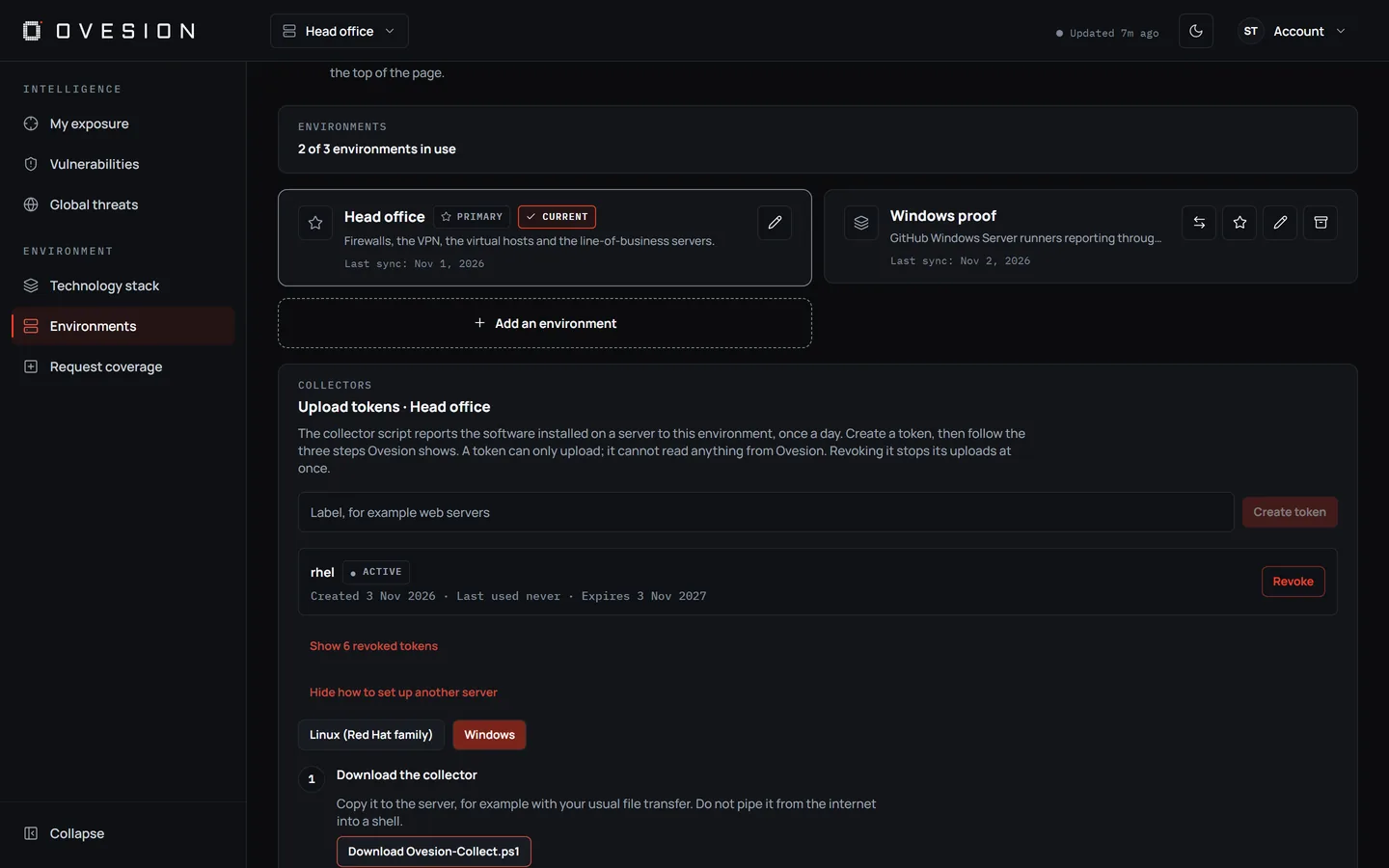
  • Up to 3 independent managed environments, named however you like (for example Head office, Production or a client site)
  • Each environment maintains its own stack, pressure scores, and threat list
  • Multi-environment switching
  • Environment lifecycle management: archive, reactivate, set primary
Start free, then choose Enterprise

Every account starts on Free. Upgrade from Subscription in the app.

Billed monthly or annually through PayFast. To cancel or change plan, contact support@ovesion.com. When a plan or trial ends, you return to Free and your environments are kept.

Compare all features
FeatureFreeProEnterprise
Global threats: NVD and CISA KEV every 15 minutes, FIRST EPSS daily✓✓✓
Top 5 Active Threats and Operational Threat Pressure✓✓✓
Severity and attack path views, and data freshness✓✓✓
Two-step sign-in with an authenticator app✓✓✓
Managed environments—1Up to 3
Every matching CVE checked against the exact version you enter—✓✓
Verdicts: Confirmed, Affected if installed (Red Hat packages), Needs Review—✓✓
Needs Review grouped by what settles it, with the reason on every item—✓✓
Vendor data alongside NVD: CVE records from the organisations that assign CVEs, and security advisories from a growing list of vendors—✓✓
Act Now, Prioritise, Investigate or Monitor, from CVSS, KEV, EPSS and your deployment context—✓✓
Three explanation panels, the fix version and its source, and links to NVD and CVE.org, plus CISA KEV and the vendor advisory where available—✓✓
Email alert digests when a new CVE is confirmed against your stack—✓✓
Acknowledge or suppress findings with a reason, and export a report to CSV or JSON—✓✓
Watchlist for the CVEs you follow—✓✓
Vulnerabilities: CVEs from the last 90 days, and vendor search across every CVE Ovesion holds—✓✓
Several environments, each with its own stack, pressure scores and threat list——✓
Environment switching——✓
Archive, reactivate and set the primary environment——✓

QUESTIONS

Common questions before you sign up.

How long does setup take?

Minutes. Search the catalogue, pick the product and enter the exact version you run. First findings usually appear within a few minutes. There’s nothing to install.

What’s in the free trial?

Our team sets up trials on request: Enterprise for 30 days, with no card needed. When the trial ends, your account returns to Free, and your environments and history are kept.

Is this a scanner, and do you need access to our systems?

No. A scanner tells you what’s installed. Ovesion tells you which of the world’s disclosed vulnerabilities matter for what you run, and how urgently. You describe your technology stack (vendor, product and version) directly in Ovesion. There’s no agent, and we never request infrastructure credentials, network access or scanning permissions. Ovesion doesn’t discover assets: it knows only what you add.

Where does the data come from?

New CVEs come from NVD, which Ovesion checks every 15 minutes. NVD no longer adds product data to most new CVEs, so Ovesion doesn’t rely on it alone. It also reads the CVE records published by the organisations that assign CVEs, and security advisories from a growing list of software vendors. CISA’s list of actively exploited vulnerabilities is checked on every run, and FIRST EPSS exploitation scores are updated daily. Each finding shows which sources it came from, and the app shows when the NVD, KEV and EPSS data last updated.

Do you send alerts?

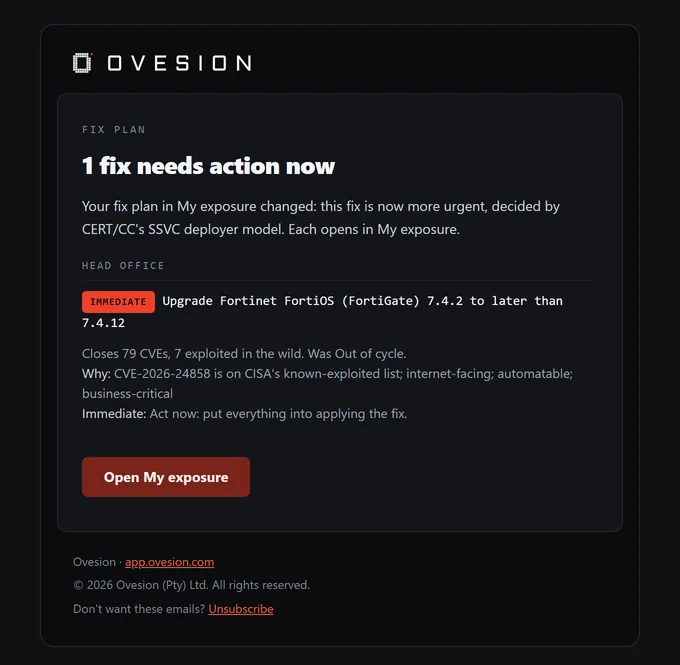
Yes, on Pro and Enterprise: one email digest when a new CVE is confirmed against the exact versions you run, at most four times a day. You won’t get every CVE that mentions your vendor, or a flood of old CVEs when you add a technology. If Ovesion’s own data changes a verdict, the next digest tells you what changed and why. Unsubscribe from any digest.

Can I import a spreadsheet, SBOM or scanner export?

Not yet. Technologies are added one at a time from the catalogue.

Can my team share an account, or track several sites?

Enterprise accounts can keep up to 3 separate environments, for example a head office, a production site or a client, each with its own technology stack, pressure scores and threat list. Today each account has one sign-in. Shared access, so several people in your organisation can work on the same environments, is planned. If your team needs it, tell us when you request a trial.

How is our data handled?

We use your data only to run Ovesion for you. We don’t sell it, we don’t use it for advertising or profiling, and we don’t send marketing emails. Your technology stack and environment data is stored in the European Union, and each customer’s data is kept separate by the database itself, not only by the app. Access is limited to the small team that runs and supports the service. To close your account or delete an environment’s data, email support@ovesion.com. Our Privacy Policy has the full details, including the providers we use.

How do I cancel or change my plan?

Plans renew automatically until cancelled. To cancel or change plan, email support@ovesion.com. If you cancel, your account returns to Free and your environments are kept.

Stop searching feeds.
Start knowing what’s actually exposed.

No agent. No network access. No infrastructure credentials.

EARLY ACCESS

You won’t be customer #10,000.

You deal directly with the people who build Ovesion. Every product request is reviewed by an engineer, and your feedback shapes what gets built next.